All your calendars.
One private view.
Merge Google, Outlook and iCloud calendars on your device, catch conflicts, hide confidential details, and share a booking link that shows only when you're actually free.
Sign in or create an account to sync across devices and share a booking link.
Works with Google Calendar · Outlook / Microsoft 365 · iCloud · Fastmail · Proton Calendar · Nextcloud · any ICS feed
Combine multiple calendars in one view — without the spreadsheet
When you live across a dozen calendars, one missed overlap costs a client or a board seat. cLion makes the whole picture visible — and safe.
Every calendar, one grid
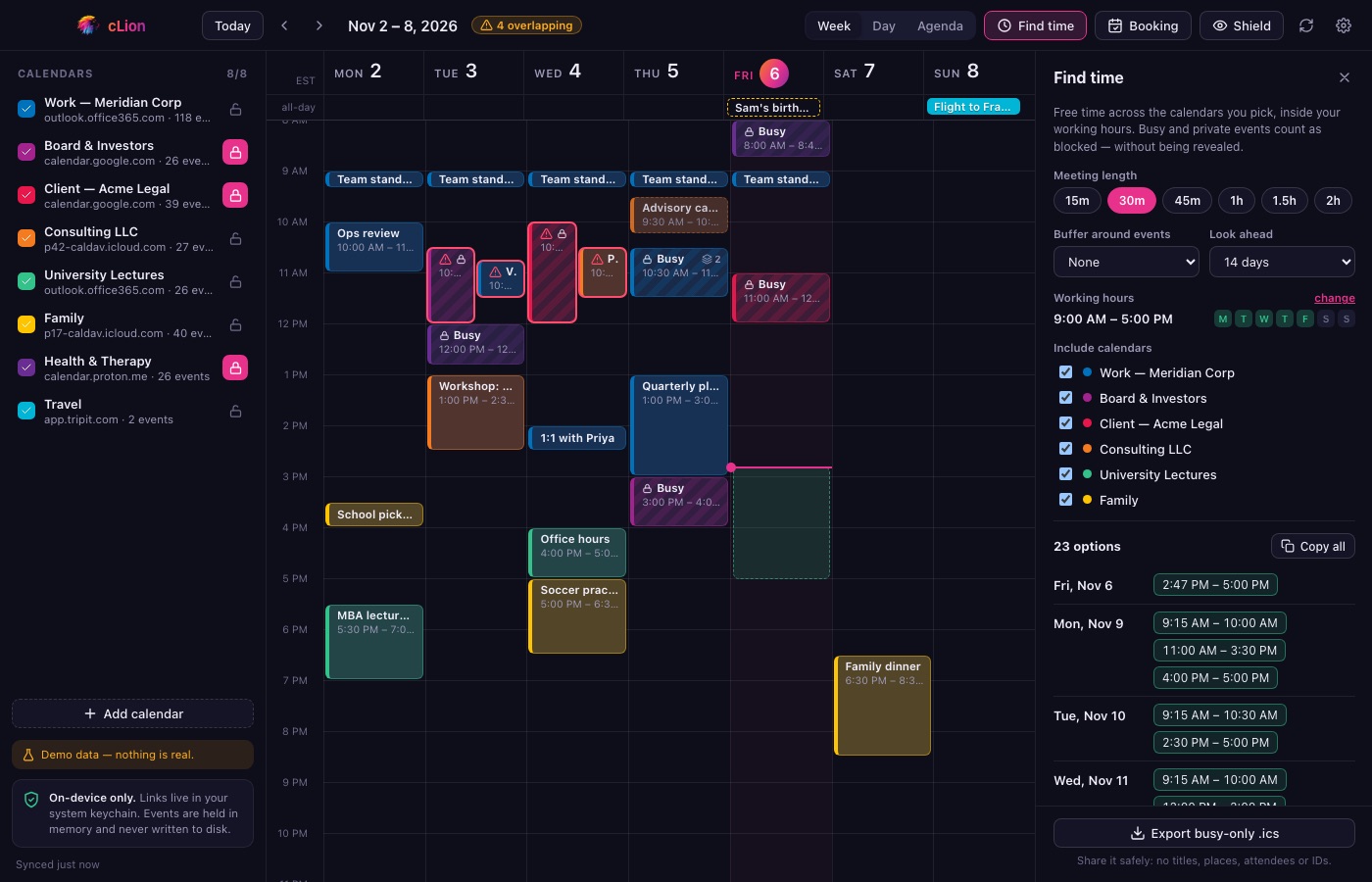
Day, week, month and agenda views over all your calendars at once, colour-coded, with overlap-aware layout.
Calendar conflicts caught instantly
Overlaps across accounts are outlined the moment they appear. Click one to see exactly what clashes.
Duplicate events collapsed
The same meeting mirrored on Work and Client calendars shows once — with a badge telling you where else it lives.
Find free time across calendars
Pick a length and buffer; cLion finds slots inside your availability across the calendars you choose. Copy them in one click.
Busy-only calendars
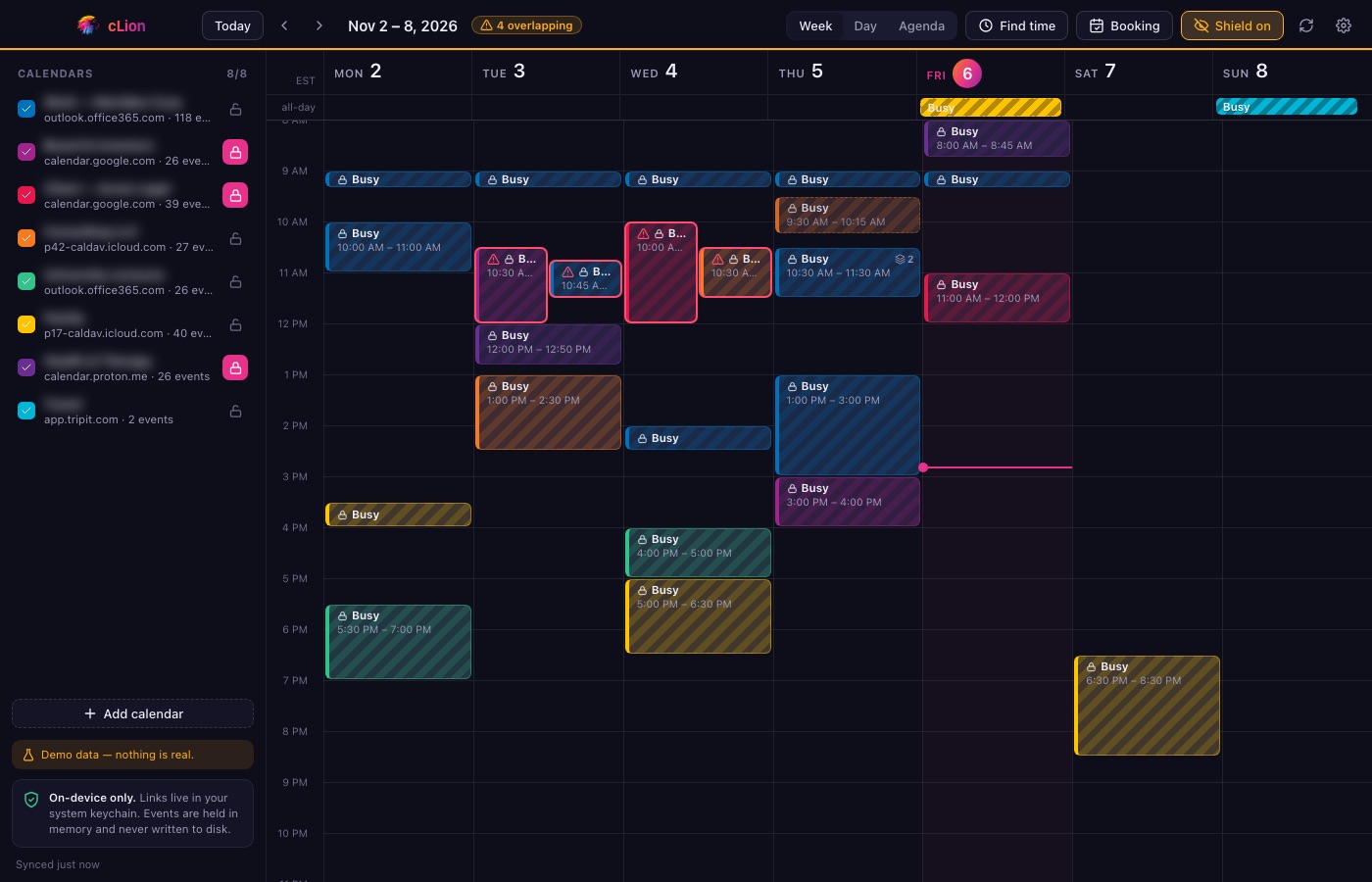
Lock any calendar to "Busy". Titles and locations are stripped before they reach the screen — and private events are always hidden.
Calendar sync across devices
Sign in once and your calendar list and preferences follow you across devices. Mobile is on the way.
Hide confidential calendar details with one key
Sharing your screen with a client? Press P. Every title, place and calendar name disappears instantly — leaving only the shape of your day.
- Privacy shield — hide all details for screen shares and over-the-shoulder glances.
- Screenshot & screen-share blocking — the window is excluded from captures by the OS.
- Auto-veil — the app hides itself the moment you switch away.
A booking link that never exposes your calendar
Share clion.app/u/you and let people grab time — without them (or us) ever seeing a single event.
cLion publishes free windows
Computed on your device from all your calendars. Only start and end times leave — no titles, no places, no attendees.
Guests pick a slot
Buffers, minimum notice and meeting lengths are yours to set. Slots are claimed atomically, so double-booking can't happen.
You stay in control
Approve each request, or auto-confirm. Everyone gets an email with a calendar invite and a cancel link.
Built for professionals with calendars to protect
If your schedule spans clients, boards or patients, privacy isn't a nice-to-have.
Executives & executive assistants
Manage an executive's work, board and personal calendars in one view, spot conflicts before they happen, and share availability without exposing details.
Lawyers & consultants
Keep client calendars confidential with busy-only mode and private-event hiding, while still seeing every real conflict across engagements.
Founders, investors & board members
Juggle company, investor, board and portfolio calendars — and offer a booking link that never reveals who you're meeting.
Clinicians, coaches & advisors
Show clients only when you're free. Appointment details stay on your device, never on a booking page or a server.
Private by architecture, not by promise
The best way to protect confidential calendars is to never collect them. Here's exactly what our servers hold.
| Data | On our servers? | Details |
|---|---|---|
| Your events — titles, places, attendees | Never | Each device fetches its own calendars. Nothing about your events is uploaded. |
| Calendar links | Encrypted | Needed to sync your list across devices. Encrypted with AWS KMS; only a dedicated service can decrypt them, and only for you. |
| Free windows | Only if booking is on | Start and end times — nothing else. |
| Passwords | None exist | You sign in with an emailed code. Session secrets are stored hashed. |
| Everything else | Deletable | One click erases your account and all cloud data. cLion also works fully offline with no account at all. |
Download cLion for macOS, Windows and Linux
Install the desktop app. No account needed — your calendars stay on your device.
First launch: your OS may ask you to confirm (the apps aren't code-signed yet)
- macOS — open the .dmg and drag cLion to Applications. The first time, Control-click the app, choose Open, then Open again. If macOS says the app is damaged, run
xattr -cr /Applications/cLion.appin Terminal. - Windows — if SmartScreen says "Windows protected your PC", choose More info, then Run anyway.
- Linux — for the AppImage:
chmod +x cLion_*.AppImage && ./cLion_*.AppImage. cLion keeps your calendar links in the system keyring, so you need one running (GNOME Keyring or KWallet — standard on most desktops).
Questions
How do I combine Google Calendar, Outlook and iCloud calendars in one view?
Add each calendar's private ICS link (Google's "secret address in iCal format", Outlook's published ICS link, iCloud's public calendar link) or import an .ics file. cLion merges them on your device into one colour-coded week, day or agenda view.
Can cLion see my events?
Not from the calendars you connect. Those events are fetched and merged on your device and are never written to disk or uploaded. An optional account stores your calendar list (links encrypted) and, if you turn booking on, your free time windows. The one exception is cloud calendars you choose to create in cLion: they are stored in your account with their details encrypted, so they can sync and be subscribed to.
Do I need an account?
No. cLion works fully offline with no account. An account is optional and adds multi-device sync and booking links.
How does the booking link work without exposing my calendar?
cLion calculates your free windows on your device and publishes only start and end times — no titles, places or attendees. Guests pick a slot from those windows; slots are claimed atomically so double-booking can't happen.
Can I hide confidential events when sharing my screen?
Yes. Lock any calendar to busy-only, and press P for the privacy shield to hide every title, location and calendar name at once. The window can also be excluded from screenshots and screen shares, and hides itself when you switch apps.
Which platforms does cLion support?
cLion runs on macOS, Windows and Linux today, with iOS and Android planned. The desktop apps are not code-signed yet, so your operating system will ask you to confirm the first launch — the download section explains each step.
What happens if my computer is off and someone books me?
Your booking page uses the free windows your app last published. If that data goes stale, new bookings automatically wait for your approval instead of confirming.
Take back your calendar.
Download cLion for macOS, Windows or Linux. iOS and Android are on the way.